Seedream 5.0 Pro

Halloween 2026

Halloween photo editor for the photos already on your phone

This Halloween photo editor starts from a picture you already have — the front porch in daylight, last week's party, a street at dusk — and makes it look like it was taken on October 31. Pick a look, upload the photo, and Seedream 5.0 Pro Edit changes the sky, the light, the props or the colour grade while the people, the house and the framing stay where they were.

Edit a photo for Halloween

Pick a Halloween edit

Every card below is a complete editing prompt. The example images all started from the same ordinary daytime porch photo, so you can see how much each recipe changes and what it leaves alone.

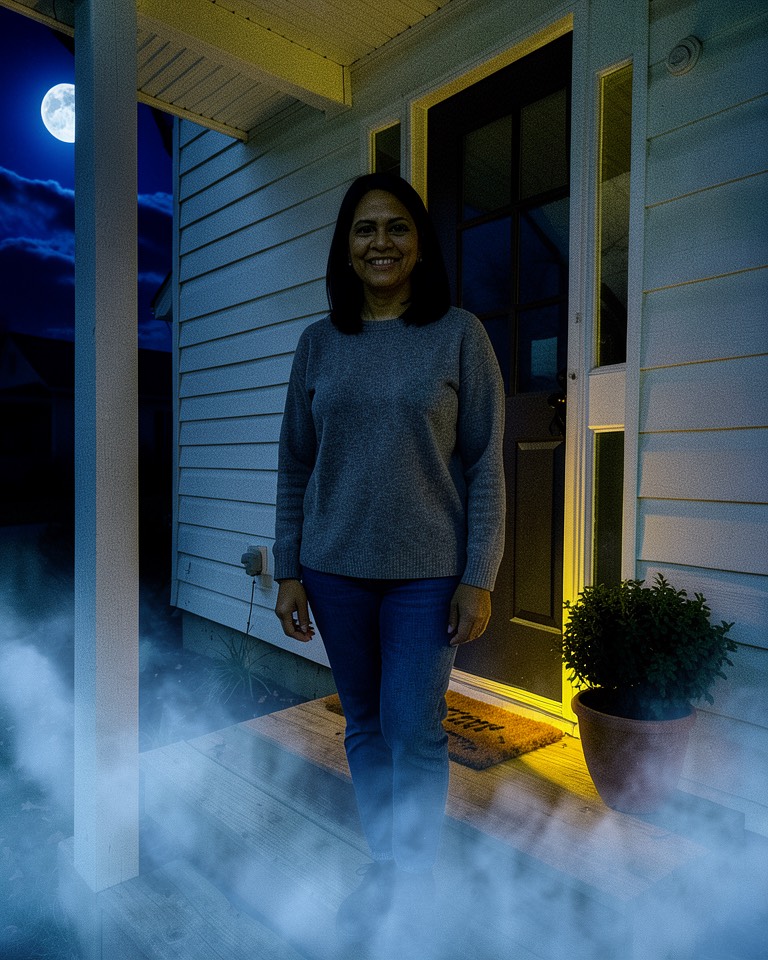
  • Halloween photo editor example: a woman in a grey sweater on a white porch, edited to a foggy full-moon night with a warm porch light

    Moonfog Porch Night

    Daylight becomes a cold October midnight: indigo sky, a full moon behind thin cloud and low fog rolling over the lawn, with the porch lamp still warm.

    Image editing prompt
    Edit this photo into a Halloween night scene. Keep the house, porch, steps, door, windows, framing and camera angle exactly where they are, and keep any person in the frame unchanged: same face, body shape, skin tone, hair, clothes and pose. Change only the time and atmosphere: replace the sky with a deep indigo night sky and a large full moon partly veiled by thin cloud, let low silver-blue fog roll across the lawn and drift around the bottom step, light the scene with cool moonlight from above plus a warm yellow glow from the porch light beside the door, and keep the windows dark. Realistic night photograph, gentle film grain, natural shadows that match the moon direction. Avoid: changing the person's identity or skin tone, extra people, monsters, bats, text, logos, watermarks.

    Animate this look (image to video)

    Keep the house, the person and the framing exactly as they are. The fog drifts slowly left to right along the lawn, thin cloud slides across the moon, the porch light flickers once. Very slow push-in, 5 seconds, no cuts, no text.
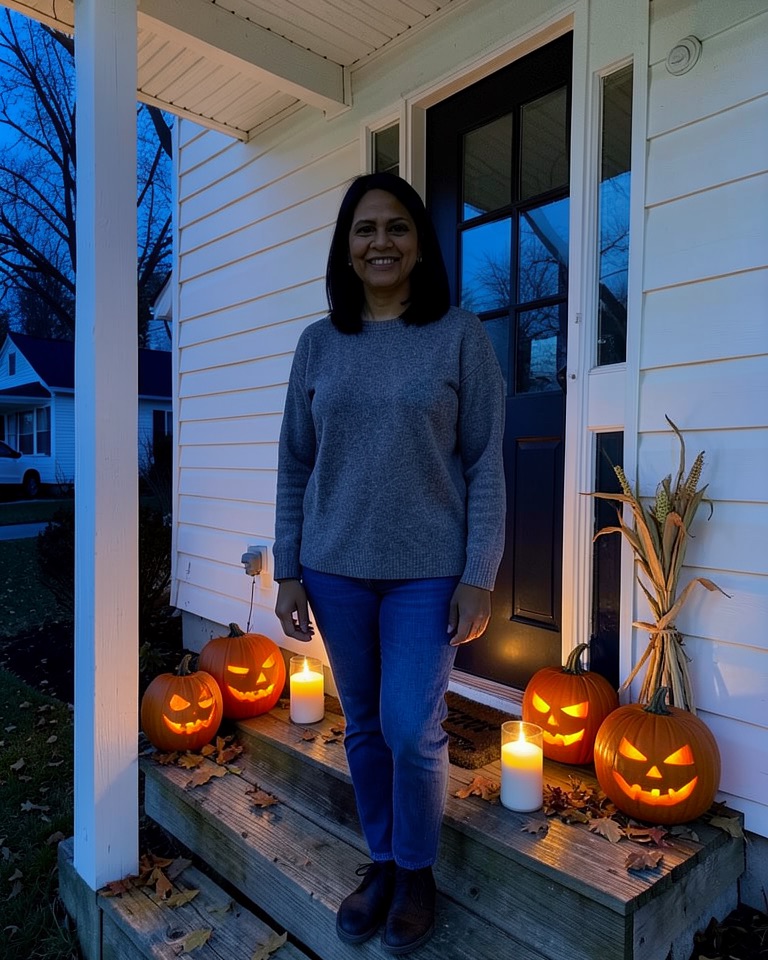
  • Halloween photo editor example: the same porch at dusk with glowing carved jack-o'-lanterns and candles lining the wooden steps

    Lantern Step Vigil

    Carved pumpkins and church candles appear on every step at blue hour, lighting the porch from below the way real candlelight does.

    Image editing prompt
    Decorate this front porch for Halloween without redrawing it. Keep the building, door, railings, steps, camera position and any person exactly as they are, including face, skin tone, hair, outfit and pose. Add six to eight carved jack-o'-lanterns of different sizes on the steps and beside the door, each with a different simple carved face glowing orange from inside, plus a few white pillar candles in glass holders between them, a scatter of fallen leaves and a small bundle of dried corn stalks against the post. Change the light to early dusk, about 15 minutes after sunset, with a blue sky and the warm pumpkin glow lighting the steps and the lower half of the person from below. Realistic photograph, accurate candle reflections on the wood. Avoid: plastic-looking pumpkins, faces carved into the house, text, signs, logos, watermarks, extra people.

    Animate this look (image to video)

    Keep everything in place. Candle flames and the light inside the pumpkins flicker softly, a single leaf tumbles down the steps, the person blinks and smiles slightly. Static camera, 5 seconds, no cuts, no text.
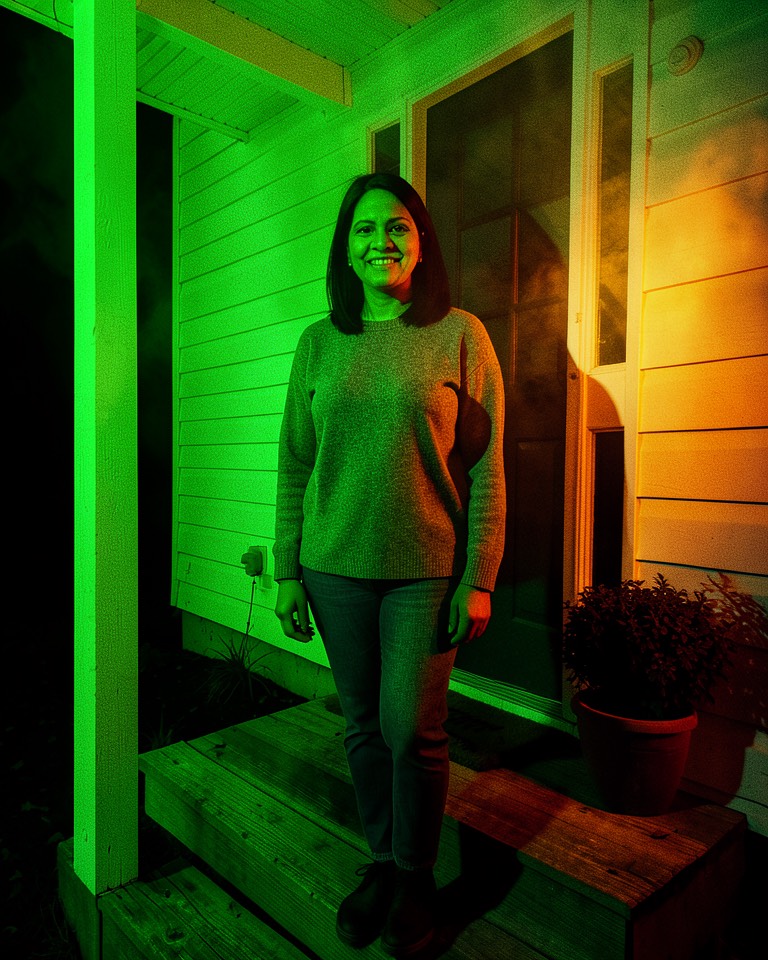
  • Halloween photo editor example: the woman on the porch relit at night with green light from the left and orange light from the right

    Haunted Gel Relight

    A haunted-house relight: acid green from one side, ember orange from the other, like theatrical gels on a cheap stage lamp. The photo stays, the mood flips.

    Image editing prompt
    Relight this photo as if it were shot at night inside a haunted-house attraction, without changing what is in it. Keep the person's face, identity, skin tone, hair, clothing, body and pose exactly the same, and keep the building, door and framing in place. Turn the ambient light off and replace it with two coloured stage lights: a saturated acid-green light from the left side and a deep ember-orange light from the right, both hard and slightly from below, so the face is split between the two colours with crisp shadows on the wall behind. Let thin haze catch the beams and keep the background falling into near-black. Cinematic night photograph, high contrast, slight grain. Avoid: changing the face or skin tone into green or orange skin paint, adding makeup or costume, monsters, text, logos, watermarks.
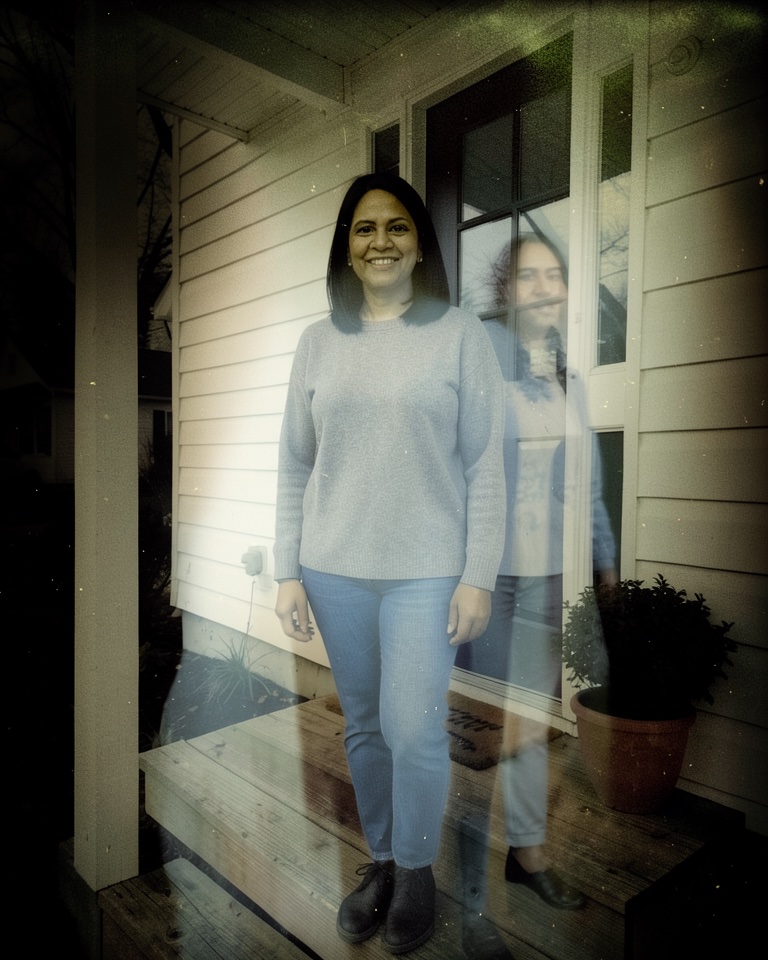
  • Halloween photo editor example: double exposure with a faint translucent copy of the woman standing beside her on the porch

    Second-Self Ghost Exposure

    A pale, half-transparent copy of the subject drifts beside them, the old in-camera double-exposure trick spirit photographers used a century ago.

    Image editing prompt
    Turn this photo into a ghostly double exposure. Keep the original person sharp, solid and unchanged: same face, skin tone, hair, clothes, pose and position, and keep the house and framing as they are. Add a second, semi-transparent version of the same person standing a little to one side and slightly behind, about 30 percent opacity, pale and desaturated with a faint cool-white glow and soft motion blur at the edges, so the background shows through it. Darken the whole frame toward evening, lower the saturation and add a light sepia-grey tone and dust specks like an old spirit photograph. If the photo has no person, place a faint translucent figure in the doorway instead. Avoid: gore, skeletons, horror faces, a third figure, text, logos, watermarks.

    Animate this look (image to video)

    Keep the real person still and unchanged. The translucent second figure slowly fades in and out and drifts a few centimetres sideways, dust specks float in the light. Static camera, 5 seconds, no cuts, no text.
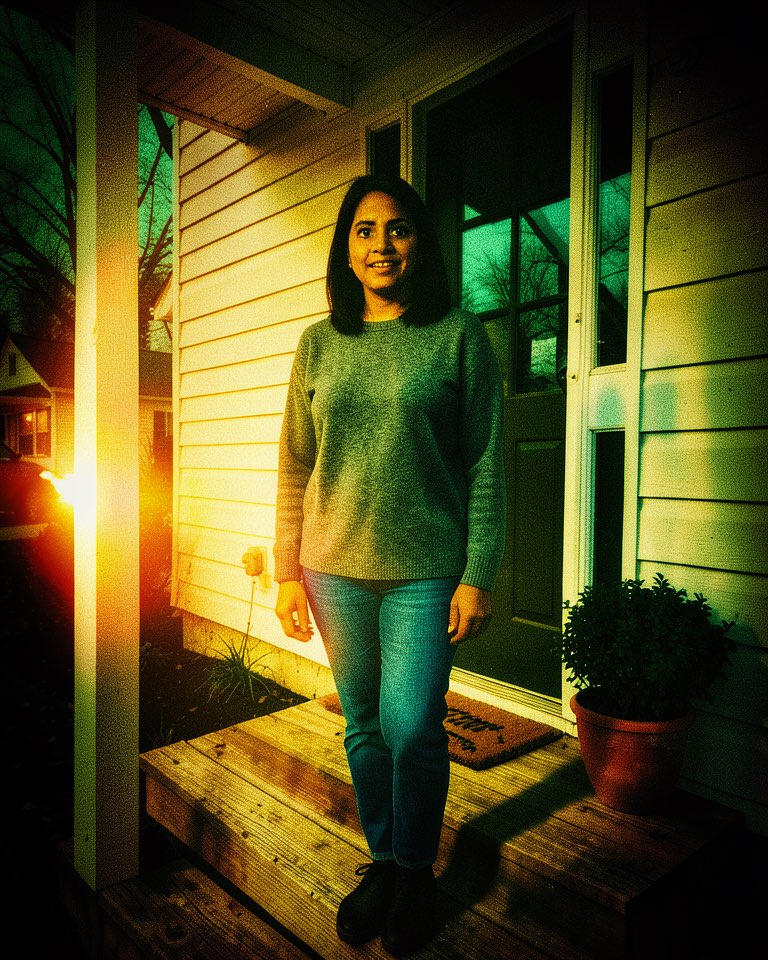
  • Halloween photo editor example: the porch photo regraded like a 1950s monster movie with a green sky, red accents and film grain

    Drive-In Creature Feature Grade

    A colour grade lifted from 1950s monster-movie lobby cards: saturated three-strip colour, a sickly green sky, blood-red accents and heavy grain. No monster required.

    Image editing prompt
    Regrade this photo to look like a still from a 1950s drive-in monster movie, without adding a monster. Keep the composition, the house, the porch and any person exactly the same: same face, skin tone, hair, clothing and pose. Change only colour, light and texture: an early three-strip colour look with a sickly green-teal sky, deep red and mustard accents, crushed blacks, strong vignette, hard dramatic key light from low on one side as if from a car headlight, visible halation around bright edges and heavy cinema film grain with slight softness. Make the person look startled-but-natural only through the lighting, not by changing the expression. Avoid: titles, poster text, credits, logos, watermarks, creatures, changing the person's identity or skin tone.

The example images were made from one fictional AI-generated porch photo with an open image model (FLUX.2 klein) during testing, not with Seedream 5.0 Pro. Your result depends on your photo and the model you select.

Edit your own photo

Upload the photo, keep Seedream 5.0 Pro Edit selected (or switch to Seedream 5.0 Lite Edit for a 1-credit draft), paste or load a look, and generate. Change one sentence at a time if the first result is close but not right.

Add inputsAttach images, videos, or audio that are part of what you want to create.
0/3

JPG, PNG, WebP · 20 MB max

0/3

MP4, WebM, MOV · 100 MB max

0/3

MP3, WAV, M4A, FLAC · 50 MB max

Just add the material you need. The generator will use it automatically.

0 / 5000
For text-to-image, describe hierarchy, subject, layout, exact text, materials, light, and finish. For image-to-image, upload references and describe the edit.
Choose modelCompatible models · settings update automatically

Only live routes are selectable. Your prompt stays in place when you switch.

Aspect ratio
Resolution
Prompt detail
This generation−1creditCost guide

Your image will appear here

In short

  • Five edit recipes: moonlit fog, jack-o'-lanterns on the steps, green-orange haunted relight, a ghostly double exposure and a 1950s creature-feature grade.
  • Each recipe says what to keep (faces, clothes, building, camera angle) before it says what to change, so the edit does not redraw your photo.
  • Works on people and on empty scenes: a porch with nobody on it is a perfectly good starting photo.
  • Seedream 5.0 Pro Edit costs 2 credits per image; Seedream 5.0 Lite Edit costs 1 credit if you want cheaper drafts first.

Which photos edit best

The recipes above change light and atmosphere, so the photo underneath needs enough structure for the model to hold on to. A daytime or overcast photo with the whole subject in frame works better than a dark, noisy one, because Seedream can see the edges of the steps, the door and the person before it repaints the light around them.

People are optional. An empty porch, a decorated street or a party room after everyone left all work, and the Second-Self look falls back to a figure in the doorway when nobody is in the frame.

  • Use the original file, not a screenshot of a messaging app — compression blocks turn into mush once fog is added.
  • Keep faces larger than a thumbnail if you want them to stay recognisable; tiny background faces are the first thing an edit model guesses at.
  • Crop first. If the bin or the parked car should not be in the Halloween version, remove it before editing rather than asking the model to.
  • Only upload photos you took or have permission to edit, and ask the people in them before you post the result.

Why every prompt starts with what to keep

An edit model treats anything you do not protect as negotiable. If you only write "make it a spooky night", it may also give the person a new face, move the door or add a stranger on the lawn. That is why each recipe on this page opens with a keep list — face, skin tone, hair, clothes, pose, building, framing — and only then describes the change.

The change itself is written as physical light rather than mood words: where the moon is, which side the green gel comes from, how far below the face the pumpkin glow sits. Concrete light directions give Seedream something it can render consistently, and they keep shadows matching across the frame.

Keep-list you can paste in front of your own idea
Keep the people, faces, skin tones, hair, clothing, poses, the building and the camera angle exactly the same. Change only: [your Halloween change]. Avoid extra people, text, logos and watermarks.

Combining looks without wrecking the photo

Stacking two recipes into one prompt usually produces a muddy average. Run them in sequence instead: generate Moonfog Porch Night first, download it, upload that result and run Lantern Step Vigil on it. Each pass has one job and the earlier change survives.

Seedream 5.0 Pro Edit accepts up to 10 reference images. For a Halloween edit you normally need one — the photo itself. Add a second reference only for a specific object, for example a photo of your own carved pumpkin you want placed on the steps, and name it in the prompt.

  1. Atmosphere first Sky, time of day and fog change the whole frame, so do them before anything else.
  2. Props second Add pumpkins, candles or a ghost figure to the already-dark version so they pick up its light.
  3. Grade last A creature-feature grade on top of a finished edit pulls everything into one colour world.

From still to a five-second clip

Three of the looks include an animation prompt. After you have a still you like, switch the generator to an image-to-video model, upload the edited image and paste the animation prompt. Keep the motion small: drifting fog, flickering candles, a slow push-in. Big camera moves force the video model to invent the parts of the house your photo never showed.

Video models are priced separately from image edits and the generator shows the credit cost before you submit.

Frequently asked questions

Is this a free Halloween photo editor?

Eligible new accounts get a welcome credit, which covers one Seedream 5.0 Lite Edit. Seedream 5.0 Pro Edit costs 2 credits per image. After that you need credits from a plan or a credit pack; the price is shown before you generate.

Will it change my face?

The recipes tell the model to keep faces, skin tone, hair and clothing unchanged, and Seedream 5.0 Pro is good at leaving unmentioned areas alone. Small faces far from the camera can still drift, so check the result before sharing it and regenerate if it no longer looks like the person.

Can I edit a photo with no people in it?

Yes. Moonfog Porch Night, Lantern Step Vigil and Drive-In Creature Feature Grade are written for scenes as much as for people. The Second-Self look places a translucent figure in the doorway when there is nobody to duplicate.

Can I add text like "Happy Halloween" to the photo?

Yes. Seedream 5.0 Pro renders readable text well. Add a sentence such as: add the words "Happy Halloween" in hand-painted orange letters on a small wooden sign by the steps. The looks on this page deliberately avoid text so they stay clean.

What size should I download for printing or posting?

Use the 3:4 frame for portrait posts and printed 6×8 or 9×12 prints, or 9:16 for stories. Seedream 5.0 Pro offers 1K, 1.5K and 2K output; pick 2K if you plan to print.

Updated 2026-10-20.